
Traits
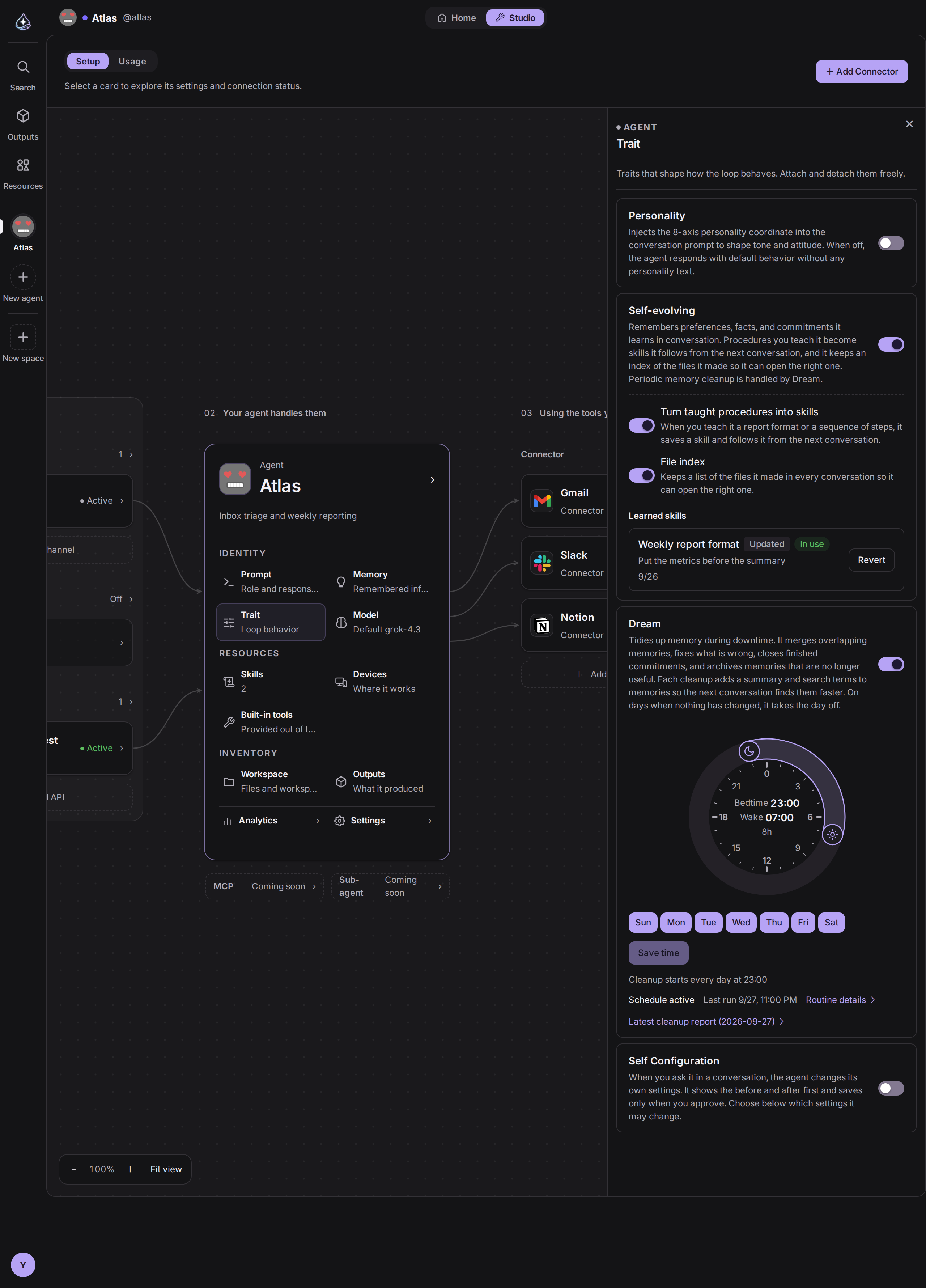
A trait turns one behavior of the agent on or off. Unlike the system prompt, which is text you write, a trait is a switch: the setting stays where it already lives, and the trait decides whether it is used.
The traits
Section titled “The traits”| Trait | What turning it on does |
|---|---|
| Personality | The character you set in the agent’s profile is included in what the model reads. With it off, the agent works from its prompt alone. |
| Self-evolving | The agent keeps what it learns in conversation. Preferences, facts, and commitments go to its memory, procedures you teach it become skills, and it keeps an index of the files it made so it can open them again. Scheduled cleanup is Dream’s job. |
| Dream | The agent tidies its memory while it is idle. It merges memories that overlap, corrects stale facts, closes finished commitments, and archives memories that are no longer useful. Then it gives each memory a one-line summary and search terms, so the next conversation finds them faster. On days when nothing changed, it rests. It runs as a routine you can see and edit like any other. |
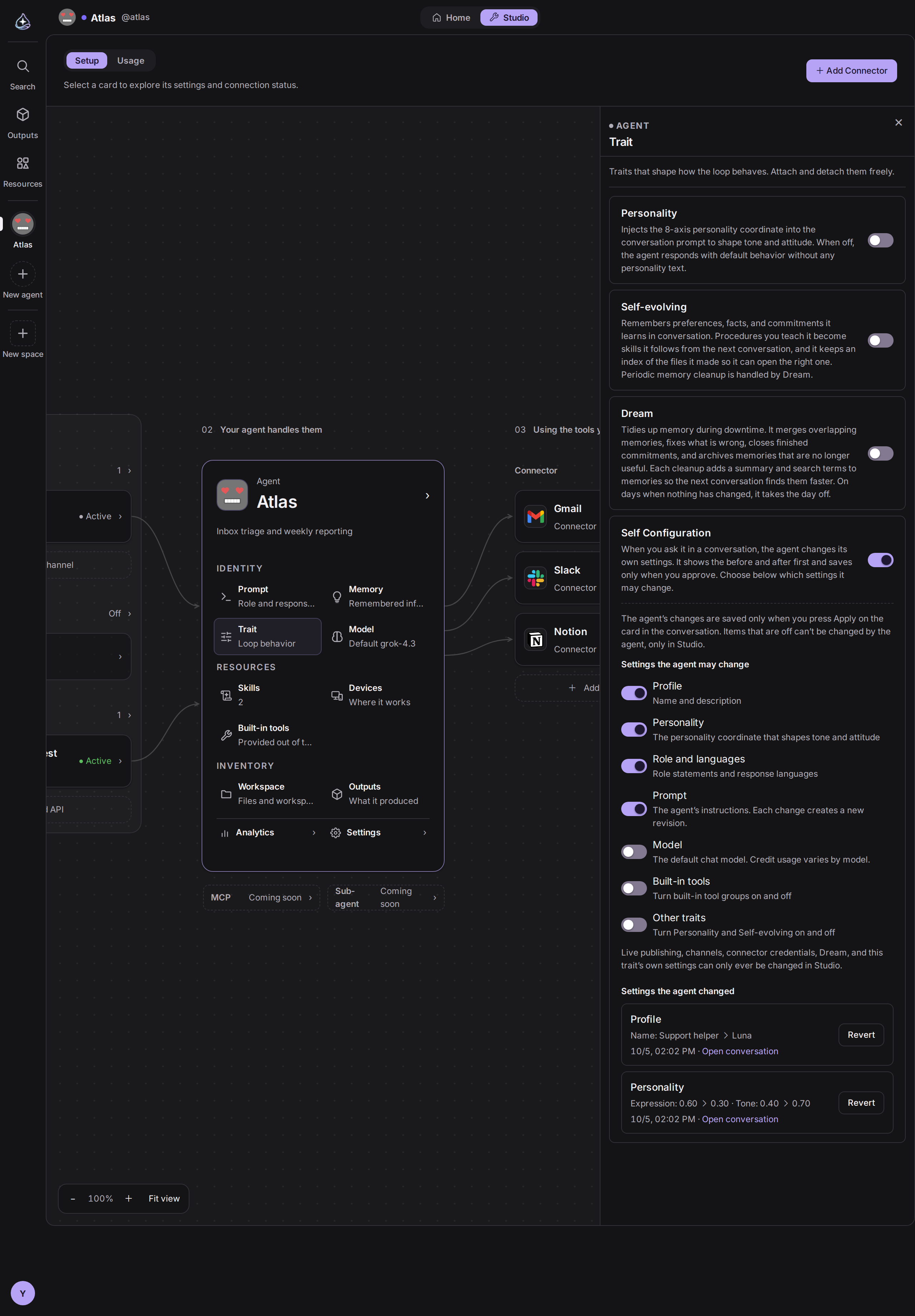
| Self Configuration | When you ask it in a conversation, the agent changes its own settings. It shows the before and after values on a card first, and nothing is saved until you press Apply. You choose, item by item, which settings it may change. |
When to use them
Section titled “When to use them”Personality is worth turning on when tone matters, as with an agent that talks to customers or one whose replies you read all day. Leave it off when you want the agent to be plain and predictable, or when you are tuning a prompt and want one fewer variable.
Self-evolving is for an agent that keeps working with the same people. It keeps a preference, a commitment, or a way of working you taught it, so you do not have to explain it again in the next conversation.
Dream earns its place on an agent that has been running for weeks and has built up memories. Overlapping and stale memories shrink, and the ones that remain get a summary and search terms. A new agent has little to tidy, and Dream creates no run on days when nothing changed, so turning it on early is fine.
Self Configuration is for an agent whose settings you keep adjusting as you use it. You say “be more concise” or “change your name” and the agent finds the setting and changes it, so you do not have to open Agent Builder and look for it. If there is a setting the agent should not touch, turn off that item.
What Self-evolving learns
Section titled “What Self-evolving learns”Self-evolving works during conversations. It has no routine of its own.
| Part | What the agent does | Switch |
|---|---|---|
| Memory | When it learns a preference, a fact, or a commitment, it writes it to memory or updates the one it already has, and says so in one line. | Self-evolving itself |
| Skills | When you teach it a procedure it will reuse, such as a report format or an order of steps, it saves an instruction skill. When you correct a skill it learned, it updates that skill. It mentions the save at the end of its reply and follows the procedure from the next conversation. | Turn taught procedures into skills |
| Files | In every conversation it keeps the paths and descriptions of up to 15 files it changed most recently. It opens the one it needs and searches by topic for files not on the list. When it changes a file substantially, it updates the description too. | File index |
Both switches turn on with Self-evolving. Turn off only the parts you do not want.
The skills and files parts run only when the owner is the one talking. In conversations with endue.live visitors, API callers, or channel users, the agent does not create or change skills and does not load the file list, whether or not Self-evolving is on. Routine runs do not learn skills either.
Reverting a learned skill
Section titled “Reverting a learned skill”Learned skills in the Self-evolving settings lists the skills the agent created or changed, newest first. Each row shows whether the skill is new or updated, what the agent learned it from, and whether it is in use.
Revert takes an updated skill back to the version before the change, and removes a new skill from the agent and your account. The agent does not create or change a reverted skill again.
The agent does not change skills you created yourself. If it sees something to improve, it suggests the change in the conversation.
What Self Configuration changes
Section titled “What Self Configuration changes”With Self Configuration on, the agent reads its own settings and proposes the change you asked for. It saves only after you approve.
-
In the trait section, turn on Self Configuration.
-
Under Settings the agent may change, choose the items you want to hand over. Profile, Personality, and Role and languages start on.
-
In a conversation, say what to change. For example: “Change your name to Luna and be more concise.”
-
The agent shows a settings change card. Each item shows the current value and the new one. A prompt change shows the lines added and removed.
-
Press Apply to save, or Cancel to leave everything as it is. An applied setting takes effect from the next reply.
| Item | What the agent changes | Starts |
|---|---|---|
| Profile | Name and description | On |
| Personality | The personality coordinate. If the Personality trait is off, the values change but the tone does not. | On |
| Role and languages | Role statements and response languages | On |
| Prompt | The system prompt. Each change creates a new revision, marked in the revision list as changed by the agent. | Off |
| Model | The default chat model. It only picks models your plan includes. | Off |
| Built-in tools | Turning built-in tool groups on and off | Off |
| Other traits | Turning Personality and Self-evolving on and off | Off |
When you ask for a change to an item that is off, the agent does not show a card. It tells you the setting can be changed in Agent Builder.
The agent also answers questions such as “which model are you using?” from its current settings. It can read items that are off.
Self Configuration runs only when the owner is the one talking. In conversations with endue.live visitors, API callers, or channel users, and in routine runs, the agent does not read or change its settings.
Reverting a changed setting
Section titled “Reverting a changed setting”Settings the agent changed in the Self Configuration settings lists the changes, newest first. Each row shows which item went from which value to which, and links to the conversation where it happened.
Revert takes that setting back to its earlier value. For the prompt, it creates a new revision restored from the earlier one. If the same setting has been changed again since, nothing is reverted and you are told so.
When Dream sleeps
Section titled “When Dream sleeps”Dream’s settings show a round clock with all 24 hours on one dial. You set when Dream sleeps with two handles, one for bedtime and one for wake time.
-
Turn on Dream in the trait section. A cleanup routine is created, starting at 04:00 bedtime and 07:00 wake time, every day.
-
Drag the two handles on the clock to move bedtime and wake time. They move in 5-minute steps. Dragging the arc between them moves both together and keeps the length. With the keyboard, focus a handle and use the left and right arrow keys for 5 minutes, or Page Up and Page Down for an hour.
-
Under the clock, pick the days Dream runs. At least one day must be selected.
-
Click Save time.
Cleanup starts at bedtime. Wake time is the last moment a cleanup can start. A cleanup that fired late, or a retry after a failure, rests for the day once wake time has passed and waits for bedtime on the next selected day. A cleanup that has already started runs to the end, even past wake time.
On a day when no memory has changed and there is no new conversation since the last cleanup, Dream skips the cleanup. No run is created, so there is no usage, and the skip does not count as a routine failure.
The clock follows the routine’s timezone. If it differs from your browser’s, the clock says which timezone it uses.
If you edited the schedule directly in the routine details, that schedule keeps running. When the clock cannot draw it, such as the 1st of every month, the clock shows a notice, and clicking Save time replaces the schedule with the clock’s time.
Each cleanup leaves a report of what it merged, corrected, and archived as a file in your outputs, under /reports/memory/. The latest cleanup report link in Dream’s settings opens it too.
Limits
Section titled “Limits”- Traits are per agent.
- The personality trait does not create a personality; it carries the one already on the profile. Change the character in Identity.
- Dream runs as a normal routine and follows the same rules. An unattended run cannot ask you anything, and each cleanup counts toward usage like any other routine run.
- Dream needs the memory built-in tools switched on.
- Self-evolving only creates instruction skills. It does not create skills that call outside services.
- Self-evolving saves at most two skills per reply. A learned skill belongs to your account, so attaching it to another agent applies it there too.
- The file index covers only the outputs the agent made. Files attached to a conversation and files on a device are not included.
- Dream does not edit or archive a pinned memory. It only adds a summary and search terms.
- Memories Dream archives are not deleted on their own. Delete the ones you do not need in Memory.
- The clock only sets times by day of the week. Any other schedule has to be edited in the routine details.
- Self Configuration only proposes changes you asked for. The agent does not change settings on its own judgment.
- Every Self Configuration change needs your approval on the card. There is no way to save without it.
- One card holds up to four items. When you approve several at once, some may fail to save, and the agent reports the result for each.
- The card shows a long prompt change only in part, and says so. The full text is in the prompt section’s revisions after you apply it. If you want to read all of it first, ask the agent for a smaller change.- If the agent wrote the first prompt for an agent that had none, Revert cannot remove it. Edit it in the prompt section.
- Changes apply to the agent’s next run.